Guide
How to stop customers reusing your first-order discount code on Shopify
Updated 2 November 2026
A welcome discount is there to win a first order from someone new. Many stores find that part of those discounts goes to people who have bought before: they come back, type a different email address, and the first-order code works again. This guide explains why Shopify allows it, what you can do about it with the settings and tools you already have, where those fixes stop working, and how to catch the rest.
Why Shopify's "once per customer" limit doesn't stop it
When you create a discount code in Shopify, you can tick "Limit to one use per customer". The limit is checked against the email address on the order. If the email has already used the code, the code is refused. If the email is new, Shopify sees a new customer.
That leaves several easy ways around it:
- A second email address. Most people have more than one, and creating another takes a minute.
- Gmail dots. Gmail ignores dots before the @, so jane.doe@gmail.com and janedoe@gmail.com reach the same inbox. To Shopify they are two customers.
- Plus aliases. Gmail and several other providers deliver janedoe+spring@gmail.com to janedoe@gmail.com. Every new +tag is a new customer for the discount limit.
- Guest checkout. A shopper who checks out as a guest never has to sign in, so nothing connects the new email to the earlier orders.
What usually stays the same is everything else on the order: the phone number, the shipping address and the name. That is the key to catching repeat buyers, and it is information Shopify's discount limit does not use.
Manual fixes and their limits
None of these needs an app. Each one makes reuse harder or less worthwhile, and each one leaves a gap.
1. Unique single-use codes from your email platform
Most email marketing tools that connect to Shopify can generate a unique code for each new subscriber, usable once. This stops a single code from being shared with friends or posted on coupon sites, which is worth doing on its own.
The limit: the code is tied to the signup, not to the person. Someone who subscribes again with a new email gets a new unique code. It also makes the signup form the place to enforce "new customers only", and most forms accept any email.
2. A minimum order value
Requiring a minimum purchase for the welcome discount makes small, low-margin orders less attractive to game, and it protects margin on every first order, honest or not.
The limit: it reduces the incentive without identifying anyone. A regular customer who spends above the minimum anyway still gets the discount again.
3. Keep the discount off products that work like cash
Shopify does not apply discount codes to gift card products. If you also sell store credit, vouchers or prepaid bundles as regular products, exclude them from the discount's eligible products or collections, so a welcome code can't be turned into something resold or used later at full value.
The limit: this closes a loophole, but it does nothing about the same person using the code on regular products.
4. Check order history and addresses before you ship
Before fulfilling an order that used the welcome code, search your orders for the same phone number, street address or last name. If you find an earlier order, you can put the order on hold, contact the customer, or cancel it.
The limit: it takes time on every discounted order, and it depends on spotting variations by eye: "901 Ocean Dr #12" and "901 Ocean Drive, Unit 12" are the same place, and a phone number can be typed with or without the country code. Busy days are exactly when this check gets skipped.
5. Customer accounts and eligibility rules
Encouraging shoppers to sign in helps connect orders to one customer record, and Shopify lets you limit a discount to specific customers or segments, for example customers who have not ordered yet.
The limit: a new email creates a new account, and that account has no orders. As long as the customer is identified by email, a second email looks like a new customer to every one of these rules.
| Fix | What it stops | What gets through |
|---|---|---|
| Unique single-use codes | Shared and leaked codes | The same person signing up again |
| Minimum order value | Small orders made just for the discount | Repeat buyers above the minimum |
| Excluding cash-like products | Turning the discount into credit | Reuse on regular products |
| Manual order checks | Repeat buyers you notice in time | Variations you miss, busy days |
| Accounts and segments | Reuse under the same email | A new email, which is a new account |
How to recognize the same shopper
To catch reuse reliably, you have to compare more than the email, and compare it in a normalized form so that small differences don't hide a match:
- Email: lowercase it, and for Gmail remove the dots and anything after a + sign before comparing.
- Phone: convert every number to one international format (E.164, such as +13055550190) so spaces, dashes and country codes don't matter.
- Shipping address: standardize street types (Drive, Dr), unit markers (Unit, Apt, #) and zip codes before comparing.
- Name and zip code: useful as a supporting signal. On its own it is weak, because common names repeat within a zip code.
A match is a signal, not proof. Family members, roommates and coworkers share addresses and sometimes phone numbers, and some shoppers ship to a parcel forwarder. Treat a match as a reason to look at the order, and keep a record of customers you have confirmed are different people so they are not flagged again.
A review process that works
- Decide which codes count. List your welcome, newsletter and first-order codes. Leave out staff, wholesale and gift codes.
- Stop what you can before payment. If the buyer's email or phone has ordered before, the best outcome is that the code never applies, so there is nothing to cancel or refund.
- Check every order with a welcome code after it is placed. Compare the normalized email, phone, shipping address, and name with zip code against earlier orders.
- Hold matches before fulfillment. A fulfillment hold costs nothing and keeps your options open. Tag the order and write down why it matched.
- Decide case by case. Release the order, contact the customer, charge the difference or cancel with a refund, depending on your policy. State the policy in your welcome offer's terms so customers know the code is for first orders only.
- Keep a blocklist. For a known problem customer, record their details so their next orders are checked automatically.
Done by hand, steps 3 and 4 are the expensive part, and step 2 is not possible with Shopify's built-in settings.
Automating it with RepeatStop
RepeatStop is a Shopify app that runs this process for you. It normalizes the email (including Gmail dots and +aliases), the phone number, the shipping address, and the name with zip code, and stores them only as one-way hashes.
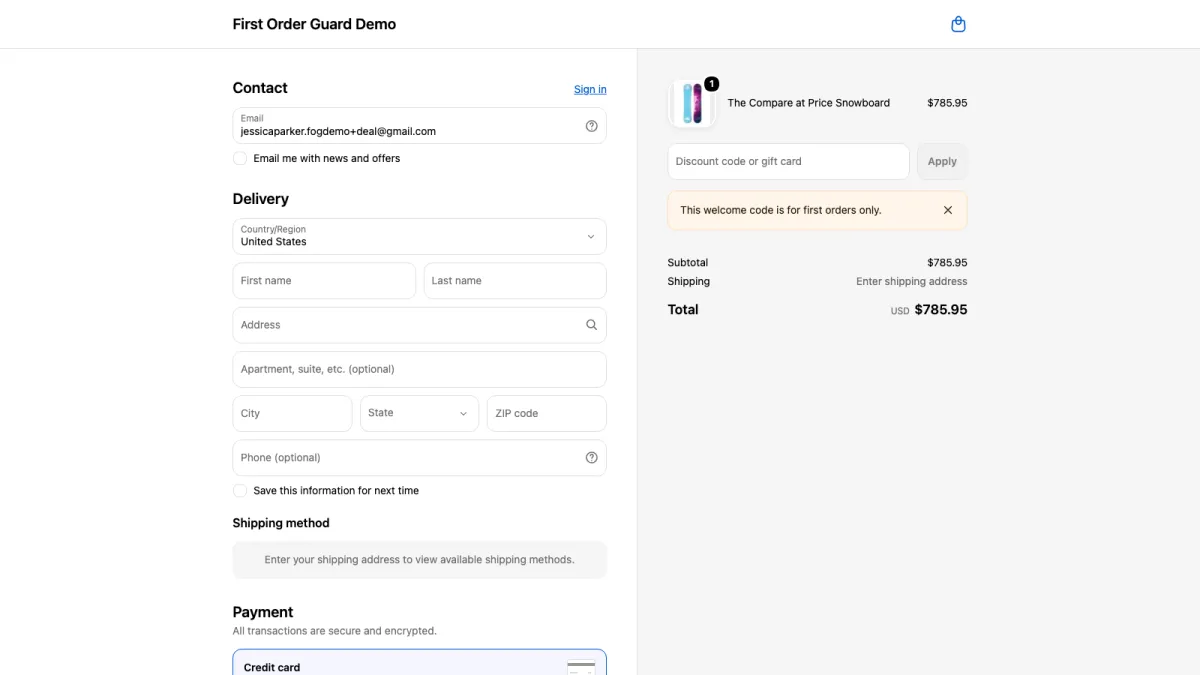
- At checkout, a Shopify discount function rejects the welcome code when the buyer's email or phone number has ordered before, with the message "This welcome code is for first orders only." It works on every Shopify plan; Shopify Plus is not needed.
- After checkout, every order with a welcome code is compared by email, phone, address, and name with zip code. Matches get the tag repeatstop:flagged and a reason such as "Same phone and address as #1005", and are held for your review before anything ships.
- Welcome codes are found automatically: codes limited to one use per customer, and codes whose names read like welcome codes in several languages. You can add your own codes and patterns too.
- Exempt tags keep wholesale, staff or B2B customers from being flagged, and a blocklist covers known problem customers.
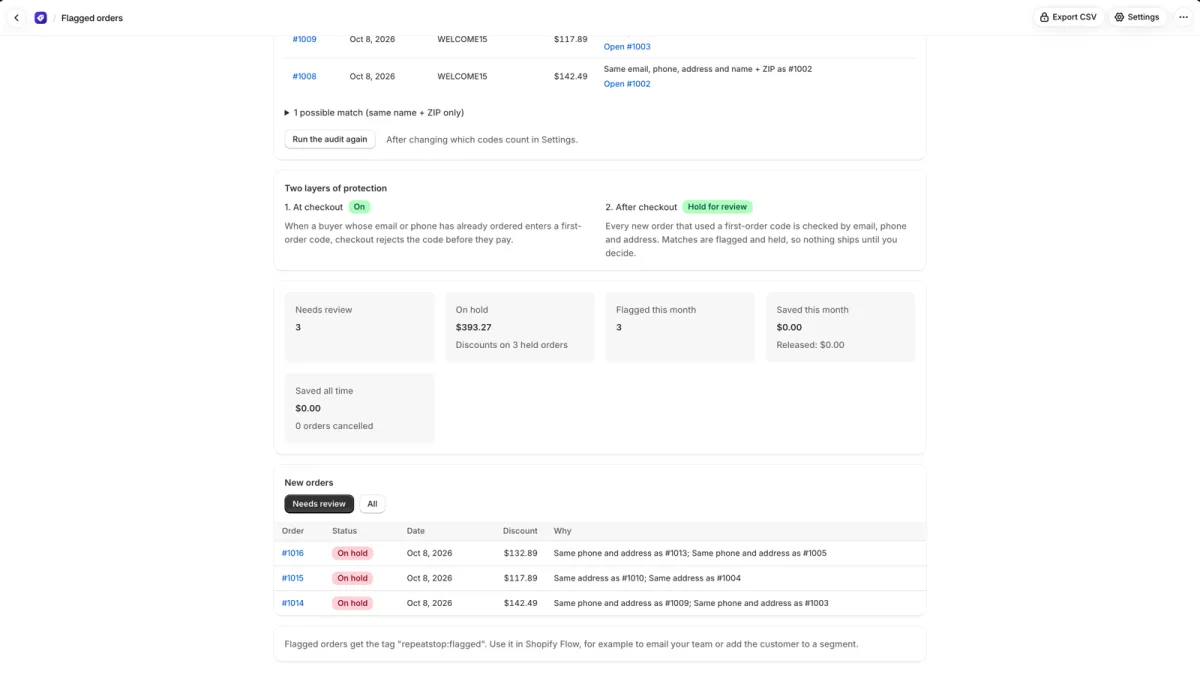
When you install it, RepeatStop checks the last 60 days of orders and shows how much first-order discount went to repeat buyers, on the free plan. Paid plans add checkout blocking and automatic holds, with a 14-day free trial. See how RepeatStop works and its plans.
Install from the Shopify App Store
Questions
Does Shopify's "limit to one use per customer" stop people using a new email?
No. Shopify identifies the customer by email address for this limit, so the same person with a different email, or a Gmail address written with extra dots or a +tag, counts as a new customer and can use the code again.
Are Gmail addresses with dots or a plus sign really the same inbox?
Yes. Gmail ignores dots in the part before the @, and anything after a + sign. jane.doe@gmail.com, janedoe@gmail.com and janedoe+shop@gmail.com all deliver to the same inbox, while Shopify treats them as three different customers.
Should I cancel orders that reuse a welcome code?
Review them first. Family members, roommates and coworkers can share an address or phone number, and some shoppers ship to a forwarding address. Holding the order before fulfillment and checking the earlier order is safer than cancelling automatically.
Do unique single-use codes solve the problem?
They stop a code being shared or posted on coupon sites, which is a real gain. They do not stop one person signing up again with a new email to receive a new unique code, so repeat buyers can still get the first-order discount.